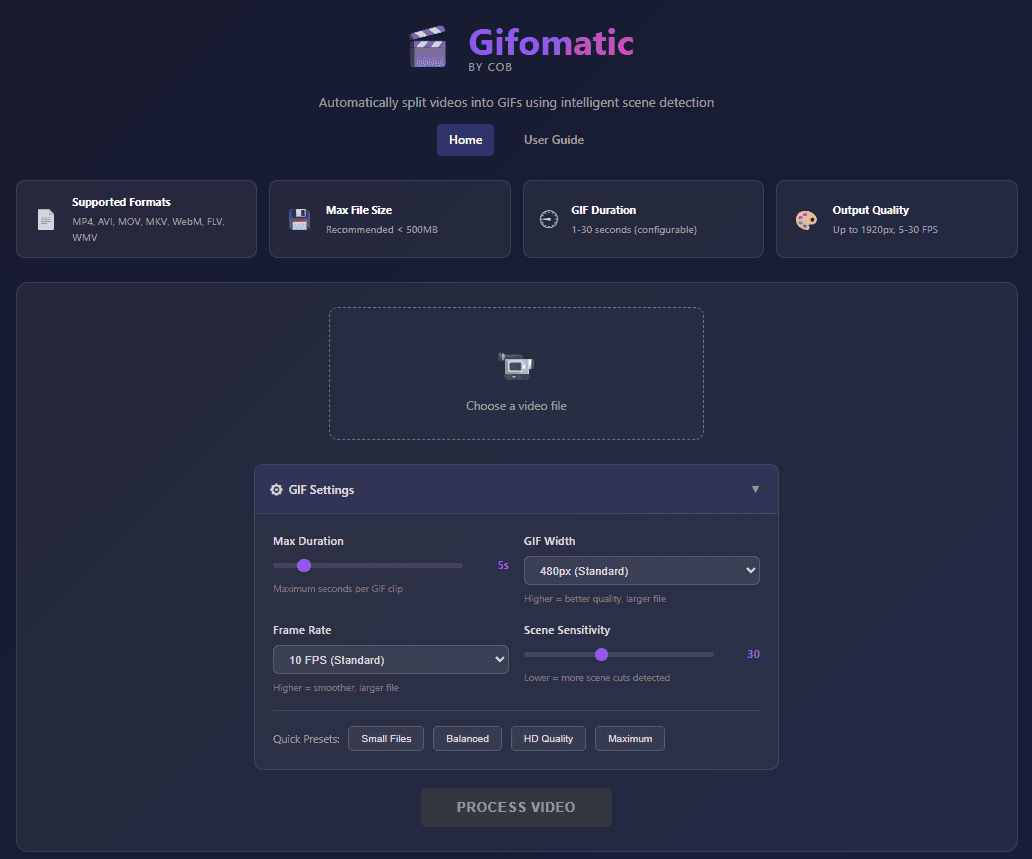
Call O Buzz Services has released COB Gifomatic, a free, open source video to GIF converter that runs entirely on your local machine. Built with Python, Flask, and FFmpeg, this tool brings intelligent scene detection to GIF creation — so developers and content creators can extract the exact moments they need from any video, without uploading files to third-party servers.
The project is available now on GitHub under the MIT license.
Why We Built This Open Source Video to GIF Converter
GIFs remain one of the most effective ways to share short visual content. Developers use them in README files, pull request descriptions, and documentation. Content creators rely on them for social media, tutorials, and presentations.
However, most existing tools have clear drawbacks:
- Cloud-based converters require uploading your video to external servers, which raises privacy concerns — especially for proprietary code demos or internal recordings
- Command-line FFmpeg workflows give full control but demand manual effort for scene selection and optimization
- Desktop applications like GifTuna or Gifski work well but often lack automated scene detection
We built COB Gifomatic to fill this gap. As a result, it combines the privacy of local processing with the convenience of a web-based interface and the intelligence of automatic scene detection.
Key Features of COB Gifomatic
COB Gifomatic is designed to be simple yet powerful. Here are the features that make it stand out:
Intelligent Scene Detection
The tool uses PySceneDetect, an open source Python library, to automatically identify scene changes in your video. Instead of scrubbing through footage manually, you get a clean list of detected scenes to choose from. This saves significant time, particularly with longer recordings.
Real-Time Processing Updates
COB Gifomatic uses Server-Sent Events (SSE) to stream processing progress directly to your browser. You can see exactly what stage the conversion is at — no refreshing, no guessing.
Batch Selection and GIF Merging
You can select multiple scenes at once and convert them in a single batch. Additionally, COB Gifomatic supports merging several GIF outputs into one combined file. This is especially useful when you want a single GIF that covers multiple key moments from a longer video.
Privacy-First Local Processing
Every step — from scene detection to GIF encoding — happens on your own machine. Your videos never leave your computer. For developers working with proprietary software demos or companies handling sensitive internal content, this matters.
Technical Stack Behind the GIF Converter Tool
COB Gifomatic relies on a small, focused set of proven open source technologies:
| Component | Technology | Purpose |
|---|---|---|
| Backend | Python + Flask | Web server and API |
| Video Processing | FFmpeg | Encoding, frame extraction, GIF creation |
| Scene Detection | PySceneDetect | Automated scene boundary identification |
| Real-Time Updates | Server-Sent Events | Live progress streaming to the browser |
This stack keeps the project lightweight and easy to contribute to. Since FFmpeg handles the heavy lifting for video processing, the output quality is reliable and well-tested.
Getting Started in Under 5 Minutes
Setting up this Python GIF converter on your local machine takes just a few steps:
git clone https://github.com/callobuzz/cob-gifomatic.git
cd cob-gifomatic
pip install -r requirements.txt
python app.py
After running python app.py, open your browser and navigate to the local URL displayed in the terminal. From there, you can upload a video, run scene detection, select the scenes you want, and generate your GIFs.
You will need FFmpeg installed on your system. Most Linux distributions include it in their package managers, and Mac users can install it via Homebrew with brew install ffmpeg.
What This Means for Developers and Content Creators
For developers, COB Gifomatic fits naturally into documentation and communication workflows. Instead of recording a full video and sharing a link, you can quickly extract the relevant 3-5 second clip as a GIF and embed it directly in your markdown files or issue comments.
For content creators, the scene detection feature removes one of the most tedious parts of GIF creation: finding the right start and end frames. Moreover, because the tool runs locally, you can work with raw footage without worrying about upload speeds or file size limits.
We see this as a practical contribution to the open source ecosystem that we continue to build at Call O Buzz Services.
Roadmap and Planned Improvements
The initial release covers the core workflow, but we have several enhancements planned:
- WebP output support — for smaller file sizes with better quality
- Custom frame rate selection — finer control over output smoothness and size
- Drag-and-drop interface improvements — a more streamlined upload experience
- Docker containerization — one-command setup for consistent environments
These priorities may shift based on community feedback and contributions.
How to Contribute
COB Gifomatic is fully open source under the MIT license. Contributions are welcome in several forms:
- Bug reports — found something broken? Open a GitHub issue
- Feature requests — suggest improvements through the issue tracker
- Code contributions — fork the repo, make your changes, and submit a pull request
- Documentation — help improve the README or add usage examples
Check out the full repository: github.com/callobuzz/cob-gifomatic
Try the Open Source GIF Maker Today
COB Gifomatic is ready to use. If you regularly convert videos to GIFs — whether for documentation, social media, or internal communication — give it a try and let us know what you think.
Visit our open source page to explore more projects from Call O Buzz Services. You can also browse our blog for technical articles, or get in touch if you have questions about our work.